Practice SSC CGL, CHSL, and RRB NTPC typing test with real DEST-style passages. Live WPM, accuracy, and keystroke tracking. 70+ practice tests available.
Pick a test and begin immediately — no sign-up required
Every test on SSCType gives you a comprehensive performance report — not just a basic pass/fail. Our analytics track your speed, identify weak areas, and show exactly where to improve.
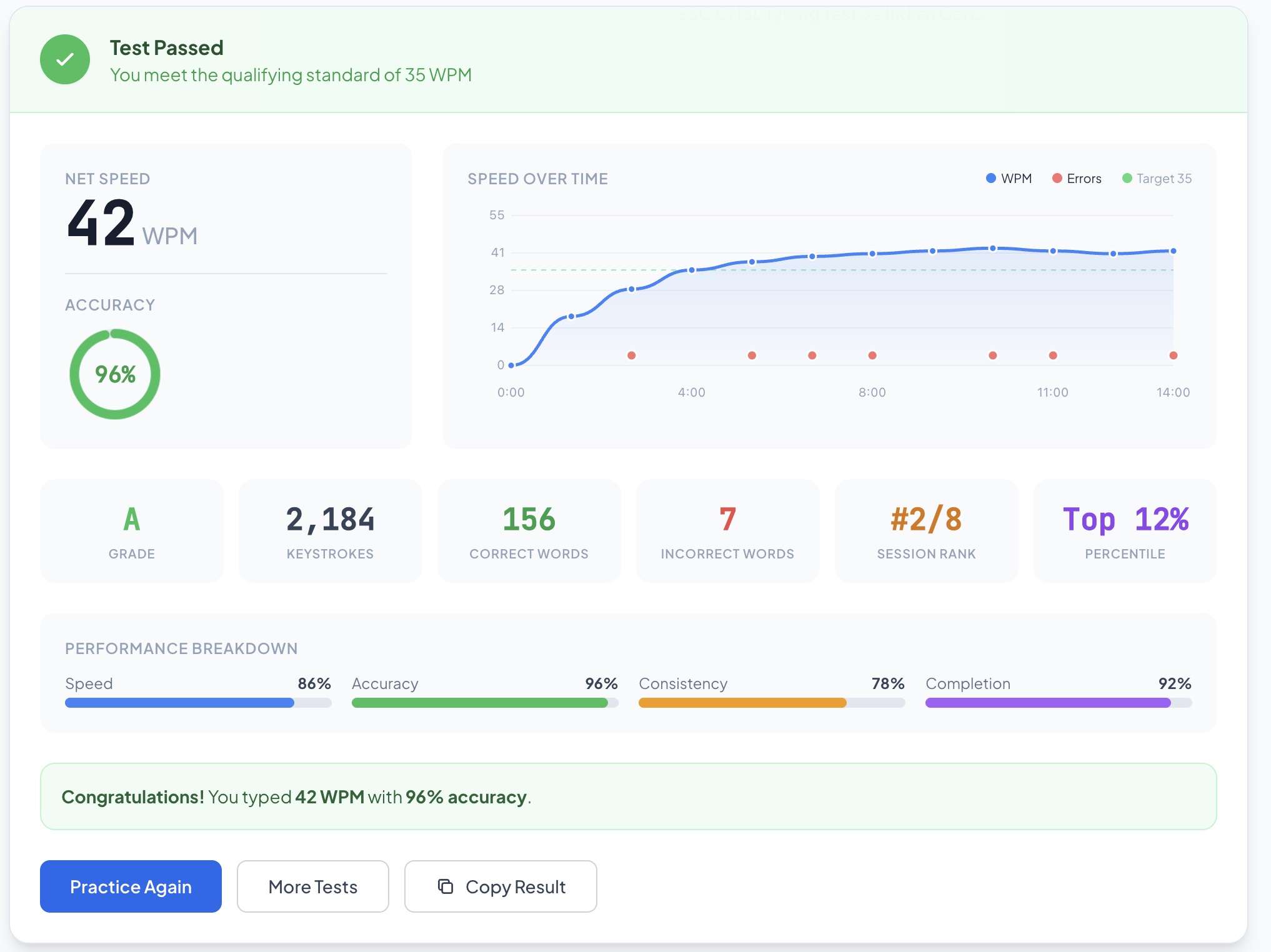
See how your speed changed every 5 seconds. Identify if you started slow or lost speed towards the end. The graph shows WPM curve, error points, and target line in one view.
Donut gauge shows accuracy at a glance. Get exact counts of correct words, incorrect words, and total keystrokes. Know precisely where errors happened.
Track progress across sessions. See your rank compared to previous attempts and percentile position. Watch yourself climb from Grade D to Grade S.
Four-metric analysis: Speed, Accuracy, Consistency (how stable your WPM stayed), and Completion (passage coverage). Each metric helps focus on what needs work.

Complete guide to SSC Data Entry Speed Test
The SSC Typing Test, officially called DEST (Data Entry Speed Test), is a mandatory skill test for government posts like Tax Assistant, Auditor, UDC, LDC, JSA, and DEO. Candidates must type an English passage within a fixed time limit. The test measures key depressions (total keystrokes), not WPM directly.
10 and 15-minute timed tests matching exact SSC CGL, CHSL, and RRB NTPC exam patterns.
Real-time WPM, accuracy percentage, and keystroke count with word-by-word visual feedback.
English passages curated in the same style as real SSC DEST question papers and RRB exams.
Start practising in 3 simple steps — no account needed
Choose SSC CGL, SSC CHSL, RRB NTPC, or Quick Practice. Each test is configured with the correct time limit and WPM requirement for that exam.
Read the DEST-style English passage on screen and start typing. The timer starts automatically. Words are highlighted green (correct) or red (wrong) in real-time.
See your final WPM, accuracy percentage, total keystrokes, and error count. The system tells you if you passed or need more practice based on your exam standard.
Select your exam type and start practicing
Tax Assistant, ASO, UDC Posts — 35 WPM required — 15 min duration
Medium
Honey Bees
Medium
Solar Energy
Medium
Digital India
Medium
Indian Space Programme
Medium
Right to Education
Medium
Indian Constitution
Medium
Cyber Security
Medium
Water Conservation
Medium
Indian Railways
Medium
Climate Change
Medium
Financial Literacy
Medium
National Parks of India
Medium
Renewable Energy
Medium
Women Empowerment
Medium
E-Governance
Medium
Pollution Control
Medium
Rural Development
Medium
Disaster Management
Medium
Artificial Intelligence
Medium
Public Health
Common questions about SSC CGL, CHSL, and RRB NTPC typing tests
Practice for all major government typing exams
Tips and strategies for SSC typing test preparation
Exam day is different. No matter how much you practice at home, the actual exam centre throws new things at you. Different keyboard. Cold room. Strange chair height. People typing loudly around you. And a timer that feels like it is going twice as fast as normal.
I know how it feels. You sit down to practice typing. You type for 20 minutes. Next day same thing. But your speed is not going up. It stays stuck at 28 or 30 WPM and you don't know why.
I failed the SSC CGL typing test in my first attempt. Not because I was slow. I was typing at 38 WPM consistently in my room, every single day for two months. But on the actual exam day, something happened. My hands felt stiff, the keyboard was different, the room was cold, and I could see other people typing and I just panicked. I submitted with 31 WPM. One mark below qualifying.